July 2026 — the entire x2y suite is now free. Code Leak Detector moves to a one-time $29 on 1 Sep.

View products

Offline 2FA Vault for Android

x2y Authenticator

v1.0.0

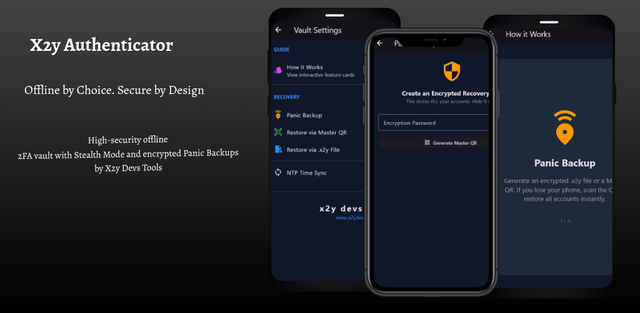
Offline by choice. Secure by design. A high-security offline 2FA vault with Stealth Mode, encrypted Panic Backups, and WiFi Companion for seamless desktop access.

ANDROID100% OFFLINESTEALTH MODEZERO TELEMETRY

Free — no account, no cloud sync, no telemetry. Your secrets never leave your device.

x2y Authenticator main interface showing TOTP codes for multiple accounts organised in smart folders with countdown timers and category tabs
x2y AUTHENTICATOR v1.0.0 · OFFLINE 2FA VAULT · SMART FOLDERS & TOTP CODES

Security features

Built for threats that other authenticators ignore

100% offline — no internet required ever

TOTP codes are computed entirely on-device using locally stored secrets and the system clock. The application has no network permissions and makes zero outbound connections. Airplane mode is the recommended operating environment.

Stealth Mode with duress protection

Configure a secondary PIN that opens a decoy vault populated with fake accounts. Under coercion, hand over the duress PIN — your real secrets remain invisible and inaccessible. The attacker sees a convincing but worthless vault.

Encrypted Panic Backup with Master QR

Export your entire vault as an encrypted backup protected by a master recovery key rendered as a QR code. Store the QR physically — in a safe, with a lawyer, split between trusted parties. Restore from it on any device running x2y Authenticator.

PIN + Biometric authentication

Unlock the vault with a numeric PIN, fingerprint, or both. Biometric data never leaves the Android Keystore — x2y Authenticator only receives a yes/no authorisation result from the hardware-backed secure enclave.

Convenience features

Security without the friction

WiFi Companion — stream codes to PC browser

Need a code on your desktop? The WiFi Companion securely streams TOTP codes from your phone to a PC browser over your local network. No cloud relay, no internet hop — the connection stays within your LAN and uses end-to-end encryption.

Smart Folders — Work, Finance, Social

Organise accounts into colour-coded categories. Switch between Work, Finance, Social and custom folders instantly. Each folder can have its own lock timeout and visibility rules.

Restore via Master QR or .x2y file

Two recovery paths: scan the Master QR code generated during Panic Backup setup, or import an encrypted .x2y backup file. Both methods restore the full vault with all accounts, folders and settings intact.

NTP Time Sync for accurate codes

TOTP codes depend on accurate time. x2y Authenticator optionally syncs against NTP servers to correct clock drift — the sync fetches only a timestamp, no personal data is transmitted, and it can be disabled entirely for air-gapped use.

Specifications

Technical details

x2y Authenticator specifications
Productx2y Authenticator
Versionv1.0.0
PlatformAndroid
ProtocolTOTP (RFC 6238)
StorageOn-device encrypted vault (Android Keystore)
SyncNone by design — no cloud, no server
AuthenticationPIN + Biometric (fingerprint via Android Keystore)
Stealth ModeDuress PIN opens decoy vault with fake accounts
BackupEncrypted Panic Backup via Master QR or .x2y file
ImportManual secret entry, otpauth QR scan
WiFi CompanionLAN-only encrypted stream to PC browser
FoldersWork, Finance, Social + custom categories
Time syncOptional NTP (timestamp only, disableable)
Network permissionsNone required for core operation
Telemetry0 bytes — verified continuously
Account requiredNone — ever
PriceFree
Developerx2y Devs Tools Ltd, Nairobi, Kenya

Quick start

From install to first code in four steps

  1. 01

    Install the APK

    Download from GitHub Releases, Uptodown or APKPure. Enable installation from unknown sources if prompted. Verify the SHA-256 checksum before installing.

  2. 02

    Set your PIN and biometric

    Create a vault PIN on first launch. Optionally enable fingerprint unlock. Configure a separate duress PIN for Stealth Mode if desired.

  3. 03

    Add accounts

    Scan an otpauth QR code from any service's 2FA setup page, or enter the secret manually. Assign each account to a Smart Folder (Work, Finance, Social).

  4. 04

    Create a Panic Backup

    Generate your encrypted Master QR recovery key. Store it physically — safe deposit box, sealed envelope, split between trusted parties. This is your lifeline if the device is lost.

WiFi Companion setup. Open the Companion panel in x2y Authenticator, then visit the displayed local URL from any browser on the same network. Codes stream over an encrypted LAN connection — no internet, no cloud, no third party involved.

Downloads

Get x2y Authenticator v1.0.0

Verify before installing. Every release is signed and accompanied by a published SHA-256 checksum on the GitHub release page. Compare the hash of your downloaded APK before enabling installation.

Changelog

Release history

MAR 2026v1.0.0

Initial release. Offline TOTP vault with PIN and biometric authentication. Stealth Mode with duress PIN and decoy vault. Encrypted Panic Backup via Master QR and .x2y file. Smart Folders (Work, Finance, Social). WiFi Companion for LAN-only code streaming to PC browsers. NTP time sync (optional, timestamp only). Zero network permissions for core operation.

Security model

Your secrets exist in exactly one place: your device

Data policy. Telemetry: 0 bytes collected. Account required: none, ever. Cloud sync: none — by design. Secret storage: Android Keystore (hardware-backed where available). Network permissions: none required for core operation. Backup: encrypted locally, never transmitted. Licence: free.

x2y Authenticator was designed around a single threat model: your secrets are safest when they exist in exactly one physical location that you control. There is no cloud copy to breach, no sync server to subpoena, no analytics pipeline to leak through. The WiFi Companion is the only feature that uses the network, and it operates exclusively within your local area network with end-to-end encryption — no packets leave your router.

Security manifest
Telemetry0 bytes collected
AccountNone required — ever
Cloud syncNone — by design
Secret storageAndroid Keystore (hardware-backed)
Network permsNone for core operation
WiFi CompanionLAN-only, end-to-end encrypted
BackupEncrypted locally, never transmitted
Duress protectionStealth Mode with decoy vault

Ready to go offline

Download x2y Authenticator — your secrets, your device, forever

No cloud. No sync. No account. Just a vault that answers to you alone — with Stealth Mode for when the stakes are highest.

Summary
Versionv1.0.0
PlatformAndroid
PriceFree
Telemetry0 bytes