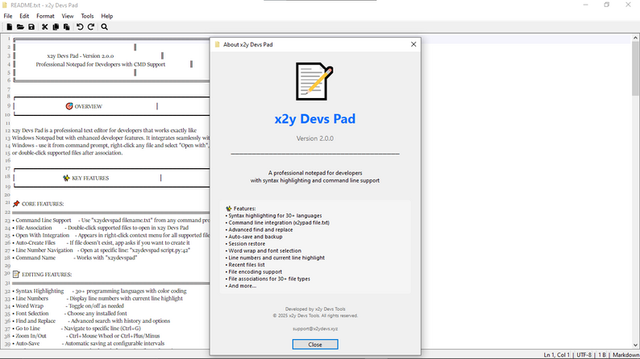
A professional text editor combining the simplicity of Windows Notepad with powerful tools for coding, scripting, and managing text files. Supports command-line usage, file associations, syntax highlighting for 30+ languages, and advanced editing features.
Free — no account, no subscription, no telemetry. A fast, quiet editor that respects your machine.
x2y DEVS PAD v2.0.0 · SYNTAX HIGHLIGHTING · LINE NUMBERS & STATUS BAR
Core features
Notepad simplicity, developer power
Command Line Support
Launch from any terminal with x2ydevspad filename.txt. Pipe output directly into the editor, open multiple files at once, or integrate into build scripts and automation workflows. The CLI is a first-class citizen, not an afterthought.
File Association and Open With integration
Register x2y Devs Pad as the default handler for any file extension. Right-click any file in Explorer and choose "Open with x2y Devs Pad". Seamless integration with the Windows shell — no context menu hacks, no registry tweaks.
Line Number Navigation
Jump directly to any line from the command line: x2ydevspad script.py:42 opens the file and places the cursor on line 42. Use Go to Line (Ctrl+G) inside the editor for instant navigation within large files.
Auto-Save with Backup System
Never lose work to a crash or power failure. Auto-save writes changes at configurable intervals, and the backup system retains the last 5 versions of every file. Roll back to any previous state with a single click.
Editing features
Everything you need between the keyboard and the file
Syntax Highlighting (30+ languages)
Automatic language detection by file extension with manual override. Highlighting covers JavaScript, TypeScript, Python, C, C++, C#, Java, Rust, Go, Ruby, PHP, HTML, CSS, SQL, Shell, YAML, JSON, XML, Markdown and more — all rendered locally with zero external dependencies.
Find and Replace with history
Full regex support in both find and replace fields. Search history persists across sessions so your most-used patterns are always one keystroke away. Case-sensitive, whole-word and selection-scoped search modes.
Go to Line, Zoom In/Out
Ctrl+G jumps to any line number instantly. Ctrl+Plus and Ctrl+Minus adjust the editor font size on the fly — useful for presentations, pair programming or tired eyes. Zoom level persists per session.
Word Wrap toggle, Line Numbers
Toggle word wrap on or off with a single shortcut — no settings dialog required. Line numbers display in the gutter with current-line highlighting. Both features are independently configurable and remembered per file type.
Word wrap toggle, line numbers, current-line highlight
File associations
Windows shell integration, Open With
Telemetry
0 bytes — verified continuously
Account required
None — ever
Price
Free
Developer
x2y Devs Tools Ltd, Nairobi, Kenya
Quick start
From install to first edit in four steps
01
Install
Download from Microsoft Store, itch.io or Uptodown. Run the installer — no administrator privileges required for standard installs. No account creation, no activation key.
02
Set file associations
Right-click any text file, choose "Open with", and select x2y Devs Pad. Or register it as the default for specific extensions from the settings panel. The editor integrates with the Windows shell natively.
03
Edit from anywhere
Double-click a file in Explorer, or open a terminal and run x2ydevspad config.yaml. Jump to a specific line with x2ydevspad app.js:128. Pipe output: dir /b | x2ydevspad.
04
Trust the backup
Auto-save runs silently in the background. If something goes wrong, open the backup panel and restore any of the last 5 saved versions. Your work is never more than a few seconds old.
Terminalx2ydevspad notes.mdx2ydevspad src/app.ts:42git diff | x2ydevspad# All commands open instantly — no splash screen, no loading spinner
Downloads
Get x2y Devs Pad v2.0.0
Verify before installing. Every release is signed. Compare the published checksum on the release page against your downloaded file before running the installer.
Major update. CLI companion binary (x2ydevspad) with line-number navigation and pipe support. UI refinements across the editor chrome. Syntax highlighting expanded to 30+ languages. Auto-save with 5-version backup retention. Find and Replace with regex and persistent search history. File association and Windows shell integration. Go to Line (Ctrl+G), Zoom In/Out, word wrap toggle and line numbers.
2025v1.x
Initial release. Core text editing engine with basic syntax highlighting. Manual save only. No CLI support.
Security model
A text editor should read files, not phone home
Data policy. Telemetry: 0 bytes collected. Account required: none, ever. File access: only files you explicitly open. Auto-save and backups: written to local filesystem only. Network connections: none — the editor makes zero outbound connections under any circumstance. Licence: free.
x2y Devs Pad is a text editor. It reads the files you tell it to read, writes the changes you make, and does nothing else. There is no analytics SDK, no crash reporter, no licence verification call, no "help improve" telemetry pipeline, no cloud sync, no account system. The auto-save and backup files are written to your local filesystem and exist nowhere else. Verify with Wireshark, Fiddler, GlassWire or your firewall logs — you will observe zero outbound connections.
Security manifest
Telemetry
0 bytes collected
Account
None required — ever
File access
Only files you explicitly open
Auto-save
Local filesystem only
Backups
Local filesystem only (last 5 versions)
Network
Zero outbound connections
Verification
Any network monitor
Ready to edit
Download x2y Devs Pad — fast, quiet, and entirely yours
No account. No telemetry. No cloud. Just a text editor that opens instantly, highlights your code, saves your work and gets out of your way.