July 2026 — the entire x2y suite is now free. Code Leak Detector moves to a one-time $29 on 1 Sep.

View products

Professional Archive Manager for Windows

x2y Extractor

v2.1.0

Professional archive manager for Windows that lets you open, browse, extract, create, convert, split, and merge archive files entirely offline. Supports all major formats with full AES-256 password encryption.

WINDOWS 10/11AES-25630+ FORMATSZERO TELEMETRY

Free — no account, no cloud processing, no telemetry. Every operation runs entirely on your machine.

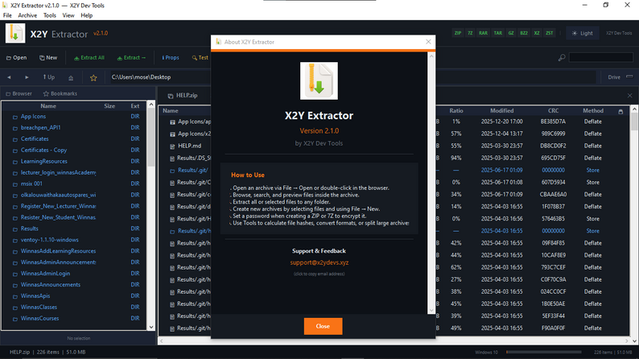
x2y Extractor v2.1.0 main interface showing the file browser with archive contents listed in a dual-pane layout, toolbar with extract and create actions, and archive properties panel
x2y EXTRACTOR v2.1.0 · FILE BROWSER · ARCHIVE PROPERTIES & TOOLBAR

Key features

Every archive operation, handled locally

AES-256 encryption for ZIP and 7Z

Create password-protected archives using industry-standard AES-256 encryption. Open encrypted archives with the same confidence — decryption happens entirely in memory on your device. No key material ever leaves your machine.

Inline file previews

Inspect archive contents before extracting anything. Preview text files, images, and metadata directly within the browser pane — no temporary extraction to disk, no leftover files. See exactly what is inside before you commit to unpacking.

30+ supported formats

ZIP, 7Z, RAR (read-only), TAR, GZ, BZ2, XZ, ISO, CAB, WIM, MSI and more. Split archives (.001, .part1) are reassembled automatically. Convert between formats without leaving the application.

Create, extract, split and merge

Full lifecycle management for every archive type. Create new archives from files or folders, extract to any destination, split large archives into volume parts for transfer, and merge split volumes back into a single file.

Supported formats

Every major archive type, read and written locally

All format handlers are bundled within the application. No codec downloads, no network fetches, no external dependencies. Highlighted formats support both reading and writing.

ZIP7ZRAR (read-only)TARGZBZ2XZISOCABWIMMSISplit (.001 / .part1)

Specifications

Technical details

x2y Extractor specifications
Productx2y Extractor
Versionv2.1.0
PlatformWindows 10, Windows 11
Read formatsZIP, 7Z, RAR, TAR, GZ, BZ2, XZ, ISO, CAB, WIM, MSI, split volumes
Write formatsZIP, 7Z, TAR, GZ, BZ2, XZ, split volumes
EncryptionAES-256 (ZIP, 7Z)
PreviewsInline text, image and metadata preview
OperationsOpen, browse, extract, create, convert, split, merge
ThemesLight and Dark
IntegrityChecksum verification before extraction
Processing100% local — no cloud relay
Telemetry0 bytes — verified continuously
Account requiredNone — ever
PriceFree
Developerx2y Devs Tools Ltd, Nairobi, Kenya

Quick start

From install to first extraction in four steps

  1. 01

    Install

    Download from Microsoft Store or itch.io. Run the installer — no administrator privileges required for standard installs. No account creation, no activation key.

  2. 02

    Open an archive

    Double-click any supported archive in Explorer, or drag it into the x2y Extractor window. The file browser loads the archive contents instantly — no full extraction required to browse.

  3. 03

    Preview and verify

    Click any file to preview its contents inline. Check the archive properties panel for compression ratio, file count and integrity status. Confirm everything looks correct before extracting.

  4. 04

    Extract, create or convert

    Extract selected files or the entire archive to any destination. Create new archives with optional AES-256 encryption. Convert between formats or split large archives into manageable volumes.

Encrypted archives. When opening a password-protected ZIP or 7Z file, the decryption key is held only in memory for the duration of the session. It is never written to disk, never cached, and never transmitted. Close the archive and the key is gone.

Downloads

Get x2y Extractor v2.1.0

Verify before installing. Every release is signed. Compare the published checksum on the release page against your downloaded file before running the installer.

Changelog

Release history

2026v2.1.0

AES-256 encryption support for ZIP and 7Z archive creation and opening. Inline file previews for text, images and metadata within the browser pane. Dark theme added alongside the existing light theme. Archive properties panel with compression ratio, file count and integrity status. Improved split archive handling for .001 and .part1 volumes.

2025v2.0.0

Interface rewrite with dual-pane file browser. Expanded format support to 30+ types including ISO, CAB, WIM and MSI. Format conversion between archive types. Batch extraction with destination presets.

2025v1.x

Initial release. Core extraction engine for ZIP, 7Z, RAR (read-only), TAR, GZ and BZ2. Basic create and extract operations.

Security model

Your files are unpacked on your machine, nowhere else

Data policy. Telemetry: 0 bytes collected. Account required: none, ever. File access: only archives you explicitly open. Decryption keys: held in memory only, never written to disk. Cloud processing: none — every operation runs on your hardware. Licence: free.

x2y Extractor reads the archives you open, performs the operations you request, and writes the results to the destination you choose. It does nothing else. There is no analytics SDK, no crash reporter, no licence verification call, no cloud decompression service, no "help improve" telemetry pipeline. Encrypted archive keys exist only in volatile memory for the duration of the session and are discarded the moment the archive is closed. Verify with Wireshark, Fiddler, GlassWire or your firewall logs — you will observe zero outbound connections.

Security manifest
Telemetry0 bytes collected
AccountNone required — ever
File accessOnly archives you explicitly open
Decryption keysMemory only — never written to disk
Cloud processingNone — all operations local
NetworkZero outbound connections
VerificationAny network monitor

Ready to unpack

Download x2y Extractor — open, encrypt, and convert, entirely offline

No account. No telemetry. No cloud. Just a fast, capable archive manager that handles every format you throw at it — with AES-256 when the contents demand it.

Summary
Versionv2.1.0
PlatformWindows 10 / 11
PriceFree
Telemetry0 bytes